Scaling Consistency: Design Systems Across Desktop, Web, and Field HMI
Katrina Ryl
Why consistent across devices is the wrong goal in industrial software, and what to aim for instead. A practitioner's take on building one design system that holds its shape across CAD desktop tools, web dashboards, and ruggedised field HMIs, where colour is a safety artefact and a Stop button has to mean Stop whether it's clicked with a mouse or jabbed with a gloved hand.
Date
Most design system writing assumes one surface and one user state: a person at a desk, indoors, paying attention. Industrial software doesn't get that luxury. The same component might render on a CAD workstation in an air-conditioned planning office, a web dashboard a regional manager checks from a hotel, and a ruggedised tablet bolted into the cab of a drill rig at 42°C with vibrations coming through the mount.
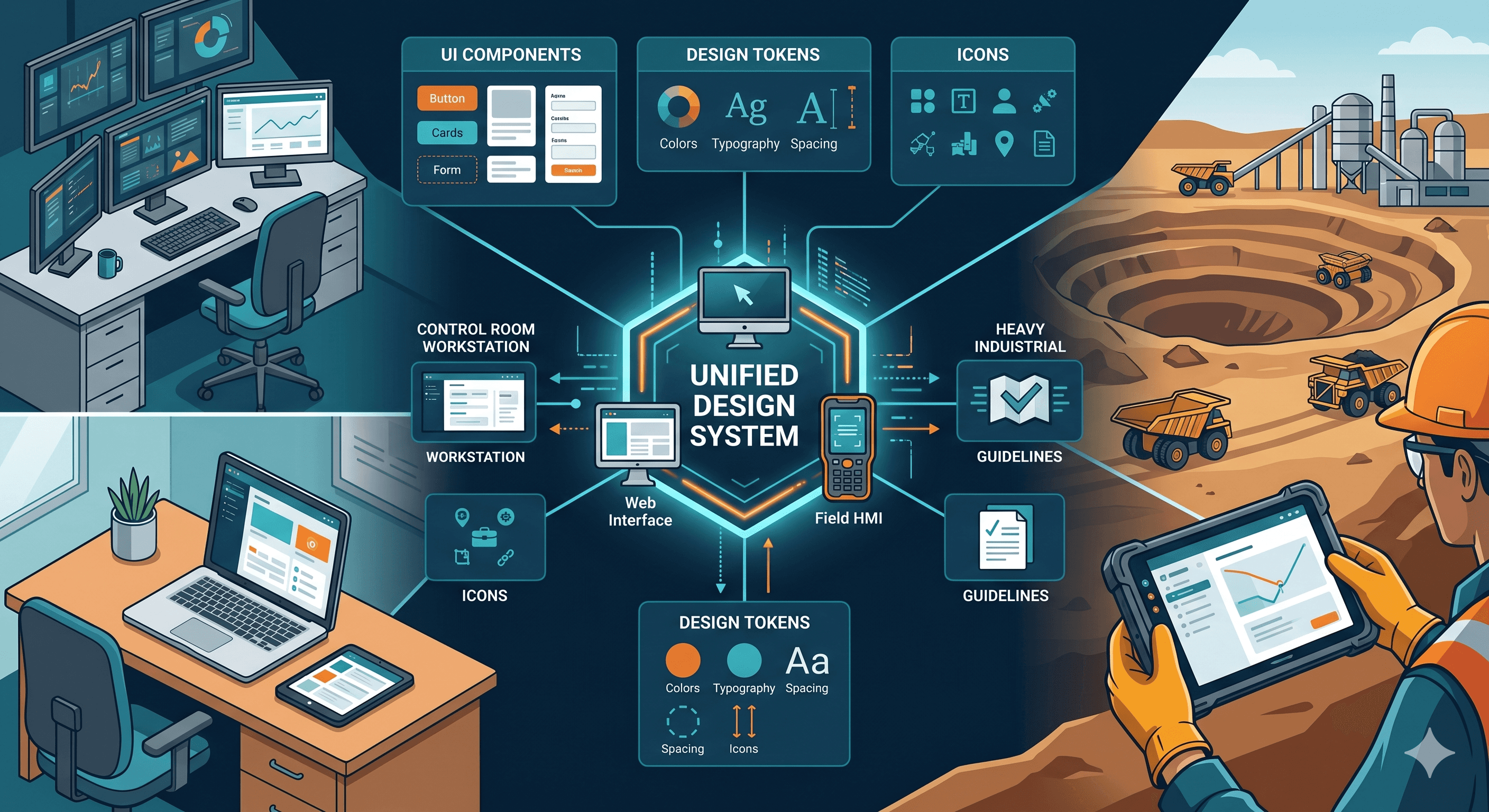
Consistent can't mean identical across those surfaces. It has to mean something more useful: that a Stop control, a hazard state, or a sync indicator means the same thing wherever it appears, even when the form factor forces it to look different. That's the actual job of a design system in the complex industrial sector, and it's harder than the polished case studies usually let on.
Here's how to think about it.
Three surfaces, three contracts
A single design system has to honour three different contracts with its users, because the cost of getting it wrong is different in each.
Desktop applications: The CAD-class tools used by blast engineers, mine planners, and surveyors are about precision and density. Users are seated, focused, and working on a single problem for hours. They want keyboard shortcuts, multi-monitor layouts, dense tables, and small hit targets that respect a mouse cursor's accuracy. Hiding information behind progressive disclosure here isn't elegant; it's friction. A blast engineer designing a pattern of 400+ holes needs to see the whole pattern and its parameters at once.
Web dashboards: These applications sit between contexts. They get used on laptops in meetings, on tablets during site walks, and on phones at airports. The contract here is responsiveness and clarity at a glance, not depth. A mistake that is often made is to try to port desktop density to the web because the data is the same. It isn't the same job.
Field HMIs: In-cab tablets, panel-mounted touchscreens on drill rigs, and handhelds carried by shot crews have the highest stakes and the worst conditions. Gloved hands, vibration, sun glare on the screen, intermittent connectivity, and an operator whose primary attention is on the physical task, not the interface. This is where most desktop-trained designers underestimate the problem.
The design system has to encode all three contracts, not flatten them into one.
Tokens carry the safety semantics
In a consumer product, colour tokens encode brand. In industrial software, they encode regulated meaning, and that changes how you govern them.
By anchoring to ISA-101 for HMI design philosophy and AS 1319 / ISO 7010 for safety colour conventions. Red is reserved for stop, fault, and emergency states, never for selected or primary CTA. Yellow/amber means caution and degraded operation. Process status colours stay muted by default so that abnormal states actually pop; an HMI where everything is saturated teal and orange has no visual hierarchy left when something genuinely goes wrong. This is the core ISA-101 move: a grey by default base state, so alarms earn their colour.
The practical implication for the token layer: semantic tokens (color.status.fault, color.status.caution, color.action.stop) are immutable. Brand tokens can be themed around them. Designers don't get to assign red to a primary button because it tested well in a usability session, that token is already spoken for.
Dark mode isn't a preference toggle in this world either. Twelve-hour shifts in low-light control rooms mean the default state is dark, and the light theme is the alternate. Luminance contrast gets specified explicitly against EEMUA 191 alarm visibility expectations, not just WCAG minimums.
One master component, contextual variants
The component architecture that actually scales is one master per concept: Button, Status Indicator, Data Table, Alarm Banner, with variants tuned per surface. The behaviour and the semantic meaning are shared. The geometry, hit area, and interaction affordances are not.
For touch targets specifically, the Material baseline of 48dp is fine for consumer mobile. It's not adequate for gloved field use. The working numbers usually used are 14–20mm physical size for primary controls on field devices, informed by industrial ergonomics research on gloved interaction and confirmed in usability testing on rig-mounted tablets. That translates to roughly 60–80dp at typical tablet density, with generous spacing between adjacent targets to prevent mis-taps under vibration.
A Stop control is the clearest example. On desktop, it's a labelled button with a keyboard shortcut. On the web, it's an icon-and-label combo sized for a cursor or finger. On a field HMI, it's an oversized, high-contrast control with a confirmation step and a guard against accidental activation. Same token, same semantics, same shared logic, three different physical expressions. The system makes sure none of those three drift in meaning, even when one team owns the desktop and another owns the field app.
Offline isn't an edge case
In mining, the web frequently means the network when it's there. Pits drop coverage, satellite links degrade, and vehicles move out of mesh range. A design system that treats offline as an error state has already failed the operator.
The patterns baked into the system from day one:
Data freshness indicators at the surface of every screen, not buried in a settings menu. Last synced 14 minutes ago is information that the operator needs to interpret what they're looking at.
Optimistic UI with clear sync state, work continues locally, queued actions are visible, and the operator can see exactly what's pending upload.
Recoverable errors with explicit retry paths. Sync failed is useless. Sync failed - 3 charge plans queued, will retry when the connection returns is actionable.
These are component-level patterns, not page-level decisions. The Banner, the Status Chip, and the Sync Indicator are first-class members of the library.
Governance is the unglamorous half
A design system in this sector lives or dies on governance, not aesthetics. The questions that matter:
Who can introduce a new semantic colour token? (Not designers acting alone - it needs sign-off because it touches safety conventions.)
How does a component change propagate from Figma to the three different codebases that consume it?
When a field HMI team needs a variant that doesn't exist yet, what's the path - extend the master, or fork? (Always extend. Forks are how systems die.)
How is documentation kept current when the components ship across products on different release cycles?
The IA I use for the documentation site reflects this: Getting Started, Foundations, Components, Patterns. Foundations is where the regulated stuff lives: colour semantics, typography, spacing, the touch target guidance, and the ISA-101 alignment notes. Components are the library. Patterns are where the cross-surface decisions get written down so the next designer doesn't have to re-derive them.
What consistency actually means
The phrase consistent experience across devices gets used as a stand-in for looks the same. In industrial software, that interpretation is dangerous. Operators don't need the field HMI to look like the desktop. They need to trust that a hazard is a hazard, a stop is a stop, and a sync state means what they think it means, regardless of which screen is in front of them.
That's the system's job. The desktop can have its density. The web can have its responsiveness. The field can have its 18mm buttons and its dark theme tuned for sunlight. What they share is the semantic layer: the tokens, the meanings, the safety conventions, and that's where the design system earns its keep.
The trendy parts of design systems writing, the gradients, the motion, and the delight barely apply here. What applies is rigour, restraint, and a willingness to treat your colour palette as a regulated artefact rather than a creative one. The reward is software that an operator can use under load, in the dark, with gloves on, and trust to behave the way it did yesterday.
That's the bar.
More Ideas
Thoughts, concepts, and ongoing explorations