Respect the Legacy, Break the Habit
Transforming a 35-year-old blast design platform for the next generation of mining operations, without losing the trust engineers had built around it.
Leading the UX transformation of a legacy CAD application with 2,000+ users worldwide, rethinking workflows, information architecture, and design foundations without losing the trust engineers had built around the existing tool.
Date
Client
Orica
Skills
UX Design
UI Design
UX Strategy
Design Systems
Research
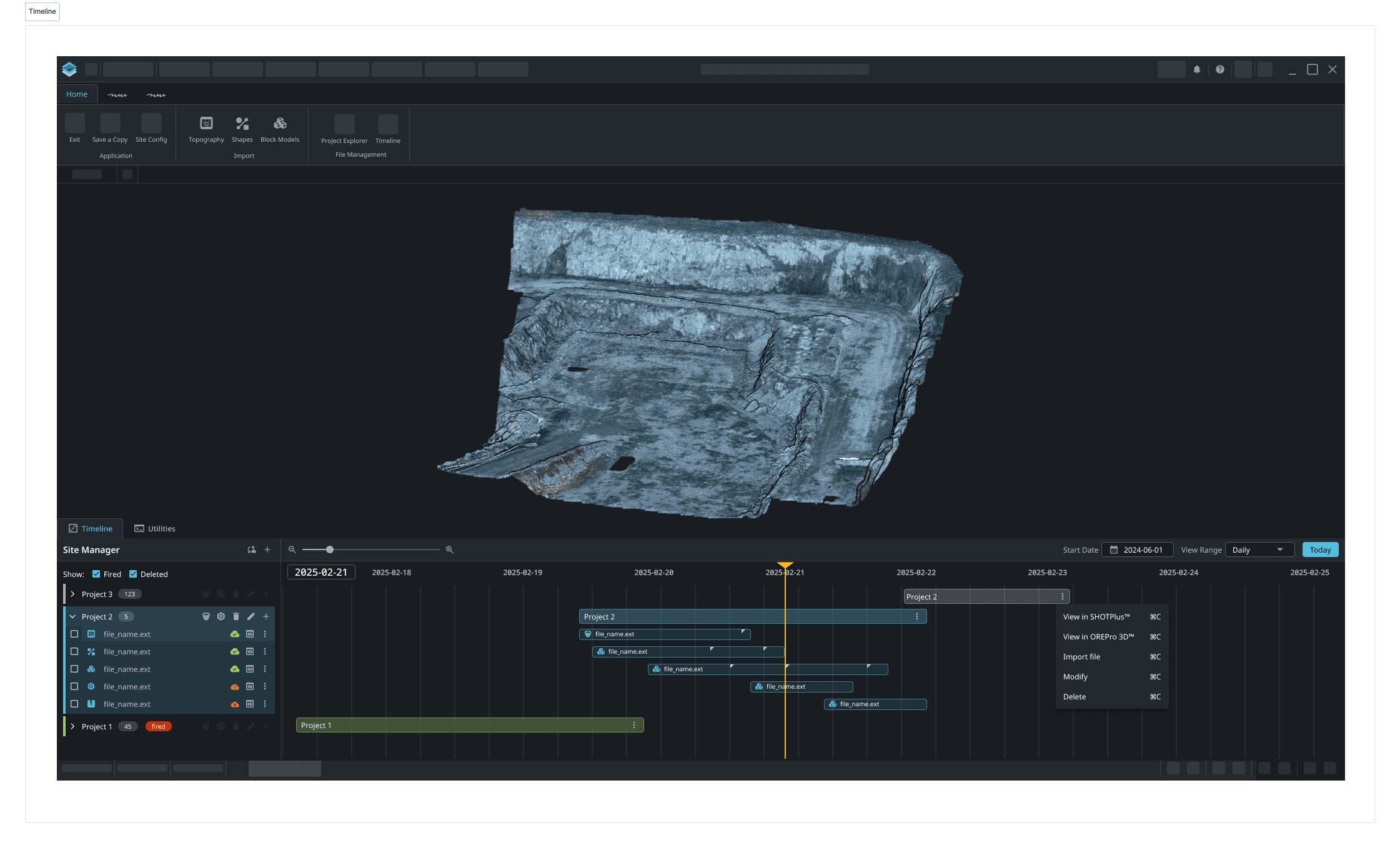
The Challenge
The product at the centre of this project had been the industry standard for blast design engineering for over 35 years. That longevity was both its greatest asset and its core design problem. The user base had built genuine expertise around a system that had evolved through additions rather than rethinking. With features layered on features, workarounds quietly normalised, and technical debt compounding beneath a surface that still felt familiar.
The organisation needed to modernise the platform end-to-end and move to a maintainable codebase, rethink the information architecture, rebuild the visual design, and lay the foundations for future AI-assisted workflows and digital twin integration. I was brought in as UX/UI Lead, embedded in a cross-functional team alongside a product manager, engineers, business analysts, and domain specialists with deep blast design expertise.
The constraint that shaped everything was that the same engineers who needed the new experience had mission-critical operations running on the existing one. Getting it wrong wasn't an option.
2,000+Active users across more than 100 countries | 35+Years of product history shaping user expectations | GlobalDeployment across mining and civil infrastructure |
Problem Framing
The instinct with a legacy system is to treat user workarounds as problems to eliminate. The more useful frame is to treat them as signals. When engineers are copying data into Excel, managing version control through local file naming conventions, or clicking through seven screens to complete a routine task, that is not bad behaviour. That's the application failing to meet them where the work actually happens.
My job wasn't to modernise the interface for its own sake. It was to understand what engineers genuinely needed this tool to do, what was worth preserving, what had accumulated by habit, and where the real friction lived. Then design from that understanding outward.
The workarounds weren't bugs in user behaviour. They were evidence of where the product had stopped keeping up with the work.
Research
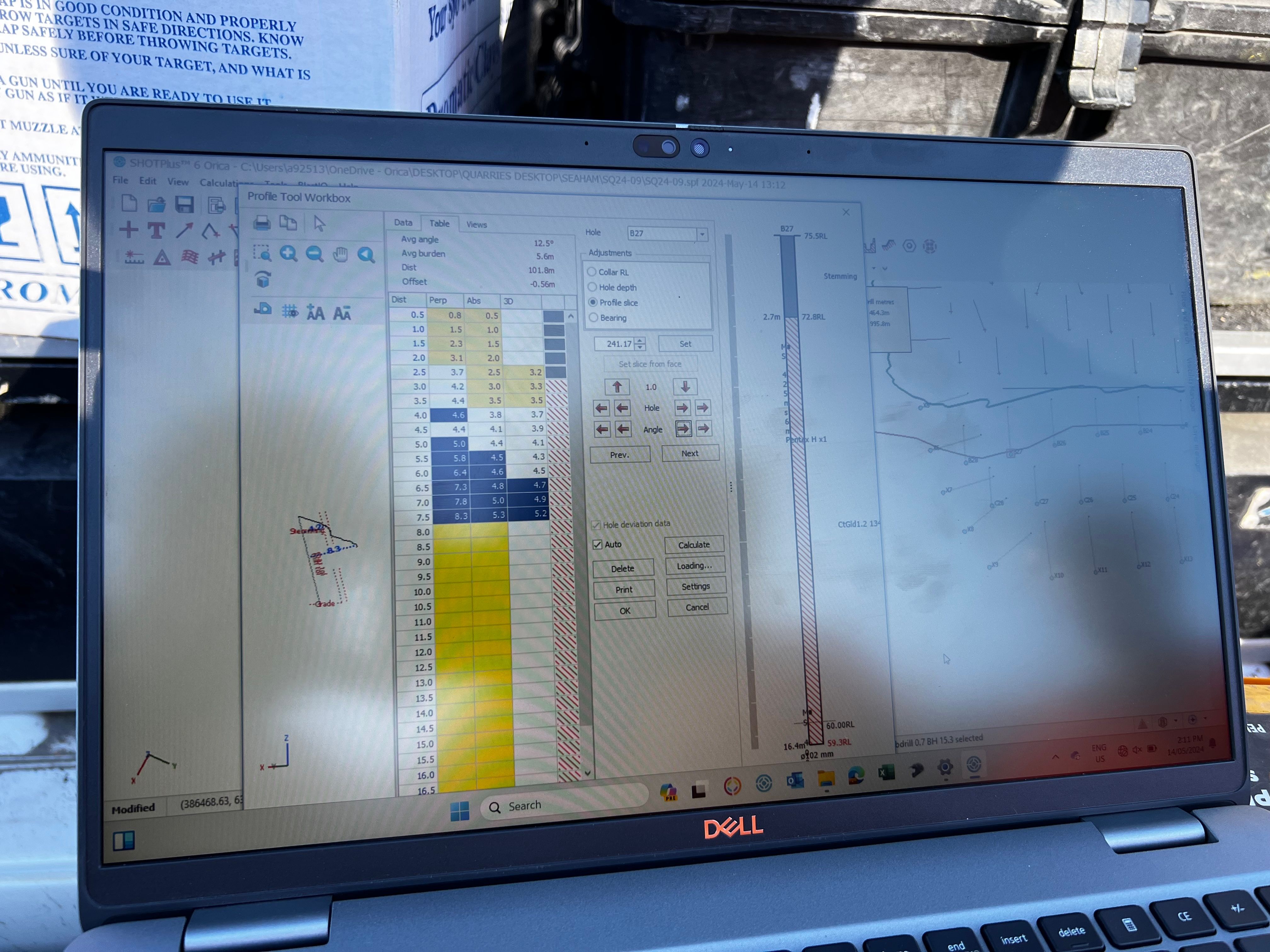
I ran the research program end-to-end, working directly with blast design engineers across open cut and underground operations. The mix of methods was deliberate; I needed both what users said about their workflows and what I could observe about how the work actually happened. Those two things are rarely identical.
One-on-one interviews
Structured conversations to surface goals, frustrations, and the mental models engineers had built around the existing system. Conducted across multiple user segments, open cut coal specialists, standard blast engineers, and underground production and development teams.Stakeholder interviews
Early alignment with the product manager, business analysts, and domain specialists to map business constraints alongside user needs, and to surface where those two things were in tension.Contextual inquiry
Observing engineers working in their actual environment. The gap between what people say they do and what they actually do is always instructive, and in a high-stakes industrial context, that gap has real consequences.Survey
Broader reach across the global user base to validate patterns from interviews and identify where individual frustrations were systemic rather than situational.Card sorting
Used to understand how engineers mentally categorised the application's features, the results fed directly into the IA restructure, ensuring the new navigation reflected user logic rather than product architecture.
One of the first things that became clear in research was that "blast design engineer" wasn't a single user type. The platform served meaningfully different roles, such as open cut coal specialists, standard blast engineers, underground production crews, and underground development and tunnelling teams. Each had distinct workflows, priorities, and operational contexts. Designing for one without accounting for the others would have been a significant mistake.
To handle that complexity, I ran separate jobs-to-be-done mapping sessions for each segment, using the when / I want to / so that I can framework. The output was a detailed JTBD matrix across all four groups, which made visible both where needs overlapped and where they diverged, giving the team a shared reference for prioritisation decisions throughout the project.
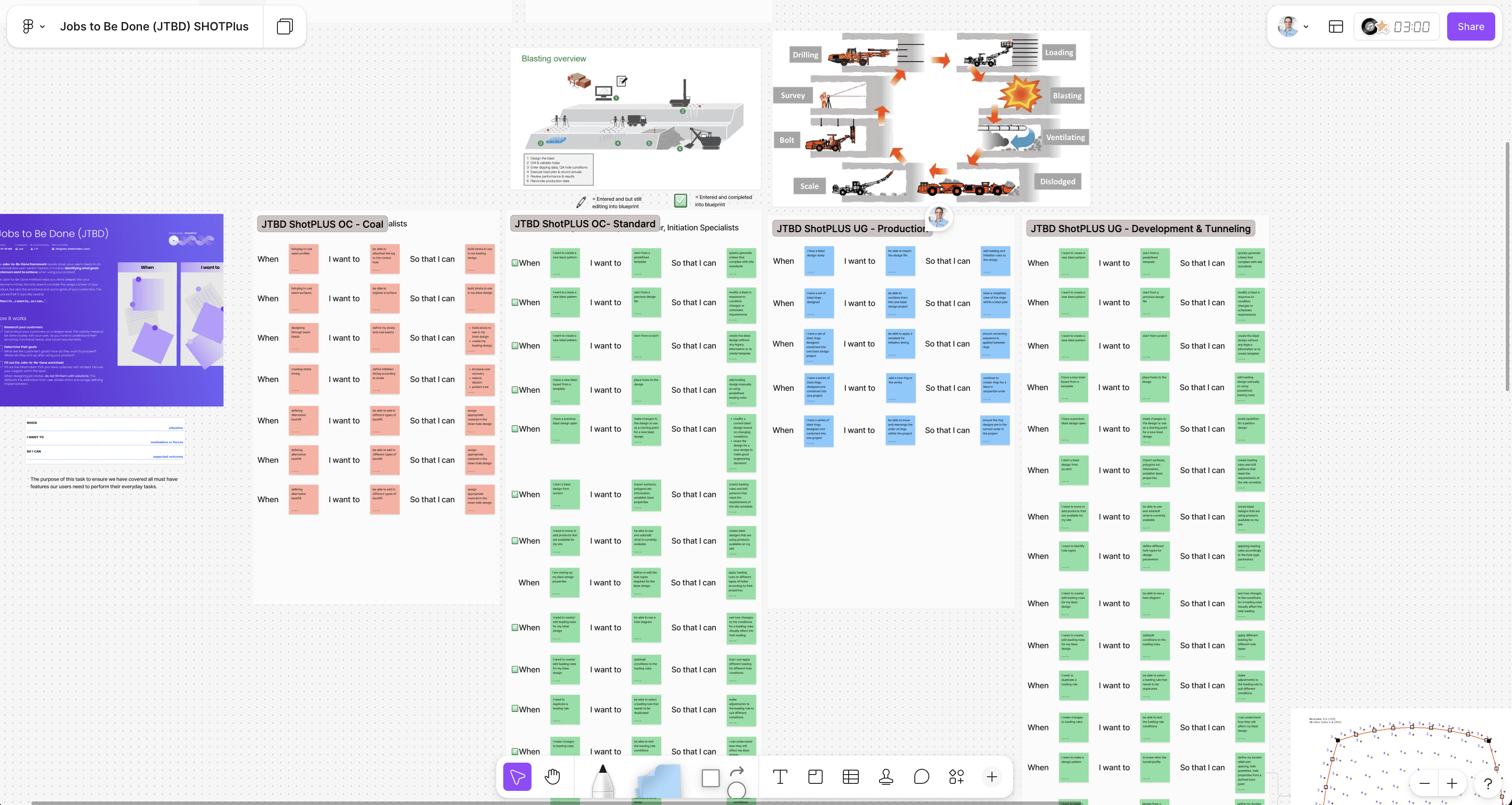
The JTBD work reframed every subsequent design conversation. Instead of debating features, we were debating which jobs the platform was actually responsible for.
Synthesis moved through three artefacts. Journey mapping captured the end-to-end blast design workflow across seven stages, from creating a design through to reporting, and made the handoff points between the application and manual processes visible for the first time. A service blueprint was then built on top of that, mapping user actions, system actions, and backstage processes across the same workflow with pain points and future-state opportunities flagged inline. This became the primary alignment tool with engineering and the PM providing a single view of where the product was failing and what the next-generation platform needed to fix.
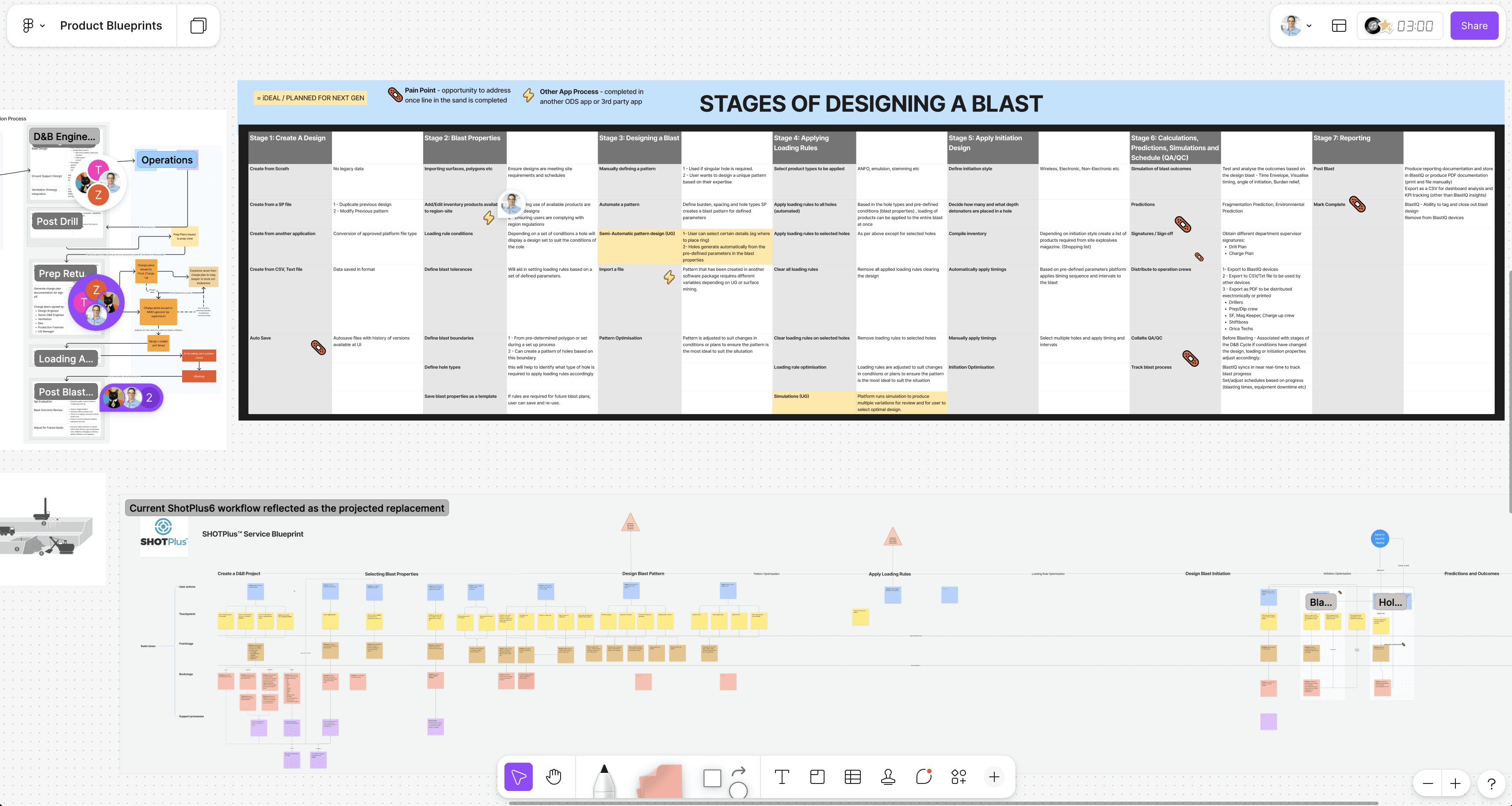
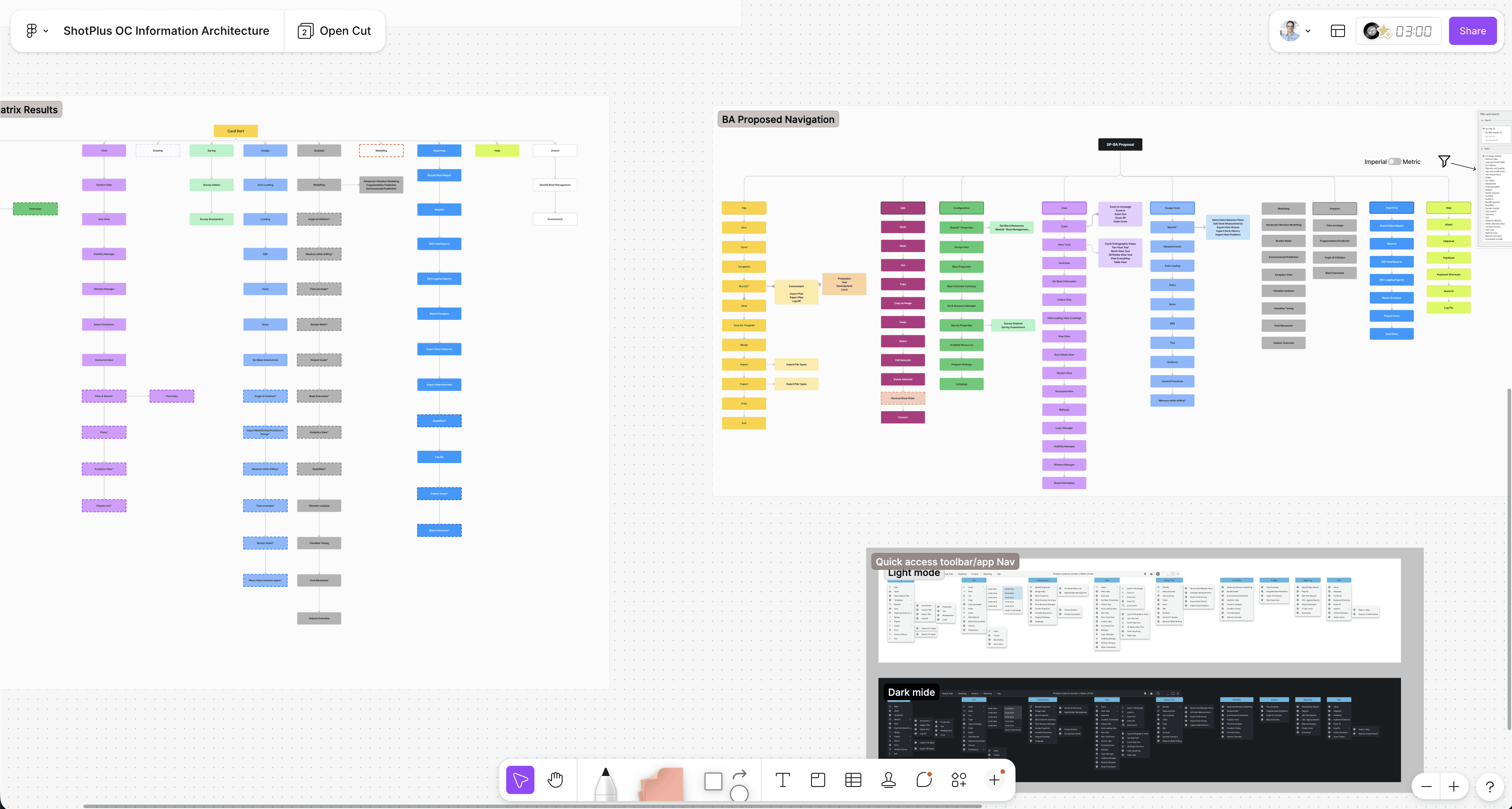
The card sort matrix fed directly into IA work. Results were mapped against a BA-proposed navigation structure and stress-tested against the JTBD outputs — producing a restructured information architecture grounded in how engineers actually think about the work, not how the legacy codebase happened to organise it.
What the research surfaced was a consistent set of operational friction points, problems adding time and risk to workflows performed multiple times a day, in environments where errors carry real consequences.
|
|
|
|
|
|
|
|
Design Approach
The original plan for this project was a full platform rebuild in Rust, a move that would modernise the codebase, improve performance, and set the application up for long-term maintainability. The UI framework chosen for the rebuild was eGUI, a lightweight immediate-mode GUI library suited to Rust's architecture.
The constraint that shaped almost everything in the design phase was that the eGUI's components were not easily customised. Unlike web-based or more mature desktop UI frameworks, there's limited ability to override default component behaviour, styling, or layout patterns without significant engineering effort. What eGUI can render well out of the box is a relatively constrained set, and the design had to live within that set if the project was going to meet its delivery deadlines.
That meant every design decision had to be cross-checked against what was actually buildable in the framework, not just what was optimal for the user. I worked closely with the engineering team throughout, not as a checkpoint at the end of a design sprint, but as a continuous conversation about what was possible, what would take disproportionate engineering effort to achieve, and where the design could find an equivalent outcome within tighter constraints.
Information architecture
Card sorting data directly shaped the new IA. The existing navigation reflected how the product had been built, not how engineers moved through their work. The restructure started from task flows and worked backward to structure, not the other way around.Workflow reduction
High-frequency tasks were mapped end-to-end and click paths audited against what the work actually required. The goal was to remove steps that existed because of legacy technical decisions, not because the work needed them.UI design for high-stakes environments
The visual redesign maintained the information density engineers rely on. This is professional software, not a consumer app. What changed was consistency, hierarchy, and the removal of patterns that introduced ambiguity in time-sensitive tasks. The application is strictly desktop, but engineers use laptops in the field, often in full sunlight on a mine site. This meant contrast ratios and legibility in outdoor conditions were treated as hard requirements, not nice-to-haves.Design system
A UI shell framework and component library built from scratch, covering the full application structure, interaction patterns, and dual light/dark themes. The first shared design language across the product suite, designed to scale across multiple applications, not just this one.Dev handoff
Handoff was treated as a design activity, not an endpoint. Annotated specs, component documentation, and regular design-dev syncs ensured that what was built matched the intent of the high-fidelity designs.Future capability architecture
The design framework was built to accommodate AI-assisted optimisation and digital twin integration without requiring structural rework when those capabilities arrived.
Key Design Decisions
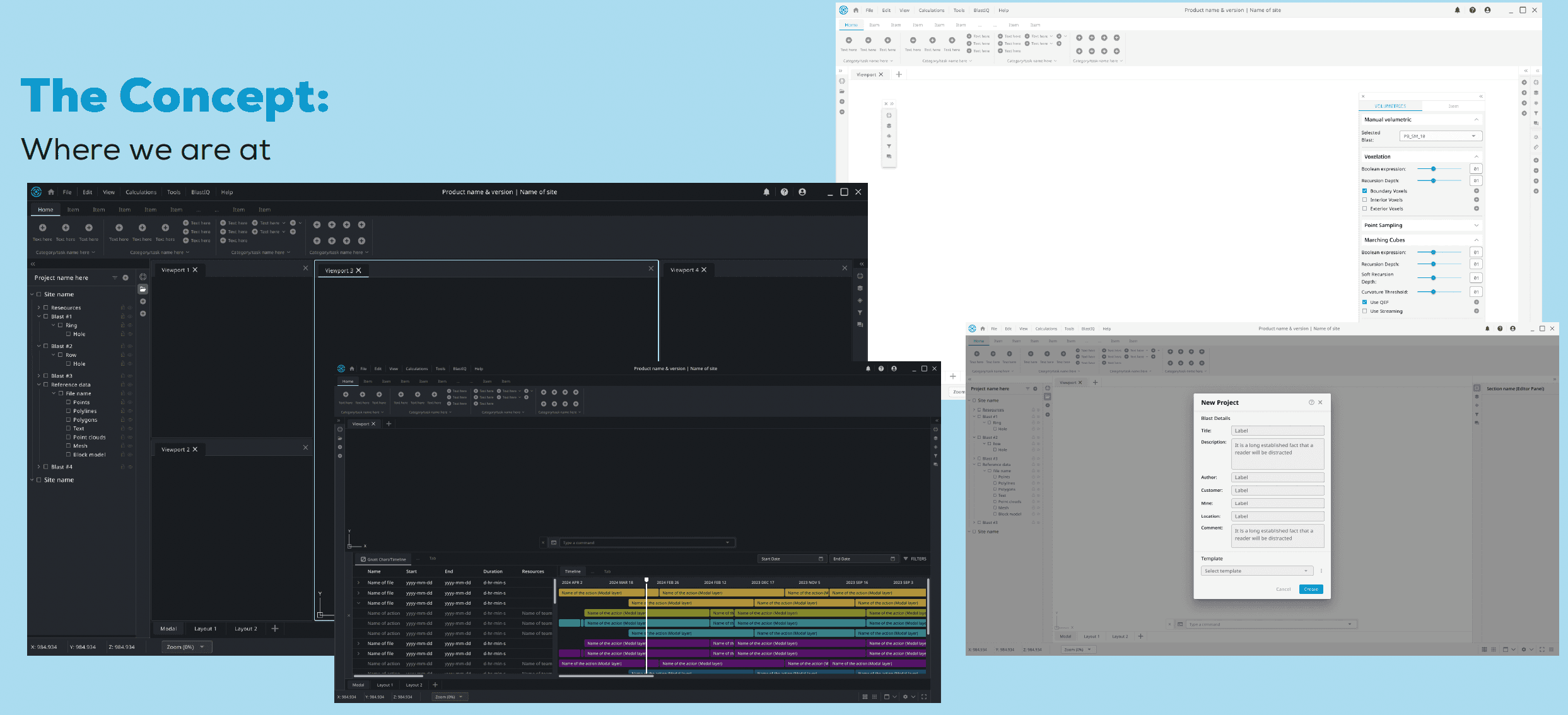
One of the more contested decisions was the multi-viewport layout. The legacy interface allowed engineers to open multiple floating windows showing the blast from different angles simultaneously. The instinct from a UI hygiene perspective was to simplify; unconstrained floating windows accumulating across a session is a pattern with real usability problems.
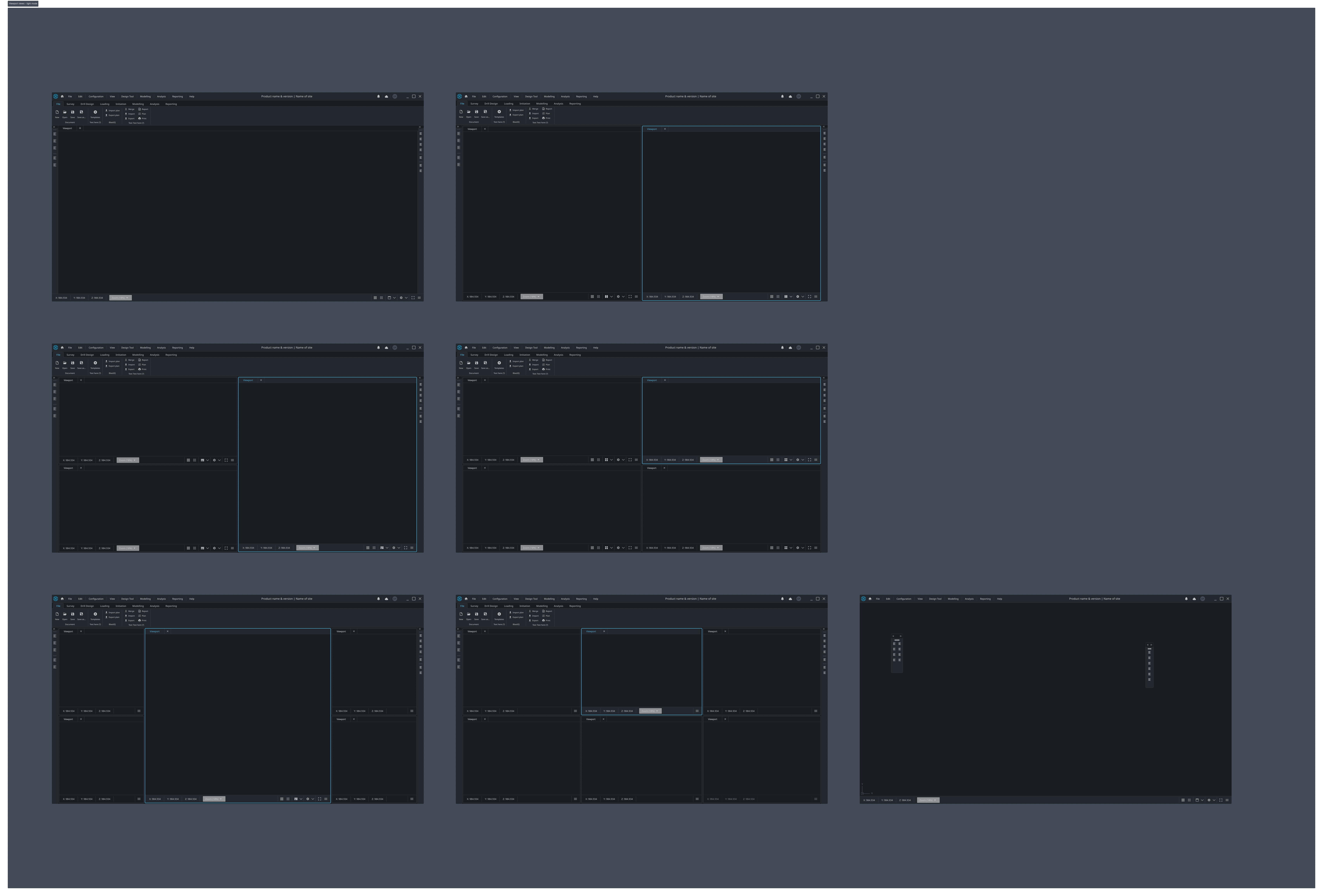
But the research was unambiguous: viewing a blast from multiple perspectives at once isn't a preference. It's a functional requirement of the work. The decision was to retain multi-viewport capability and fix the management of it, tabs, consistent controls, and named viewports, rather than remove something engineers genuinely needed to make the interface look cleaner.
That principle ran through every significant decision on this project, distinguishing between what's genuinely needed and what's accumulated through habit or technical inertia.
Where I Had to Compromise
The eGUI constraint directly influenced specific design decisions. One visual pattern I developed — designed to improve hierarchy and scanning across dense data views — required component customisation that eGUI couldn't support without engineering effort that fell outside the project timeline.
The replacement was a simpler pattern that worked within eGUI's defaults. It solved the same problem less elegantly, and I won't pretend otherwise. But it shipped, it was consistent, and it didn't create technical debt that would compound into the next release cycle.
The broader lesson: designing for a framework with constrained rendering capability is a different discipline than designing for a web stack or a mature desktop framework. The earlier you understand exactly what the framework will and won't do, the more design options you have. On this project, I learned that the hard way on one pattern — and applied it as a first question on every subsequent one.
Design System
The legacy application had no design system. Components had been built feature by feature over 35 years, producing an interface full of near-identical patterns that behaved differently, visual inconsistencies that engineers had learned to navigate, and no shared language between design and engineering. Every new feature added to that debt.
Building the design system wasn't a parallel workstream; it was load-bearing. Without it, the redesigned UI would have fragmented, just as the legacy one did. The system needed to be in place before high-fidelity design could meaningfully begin.
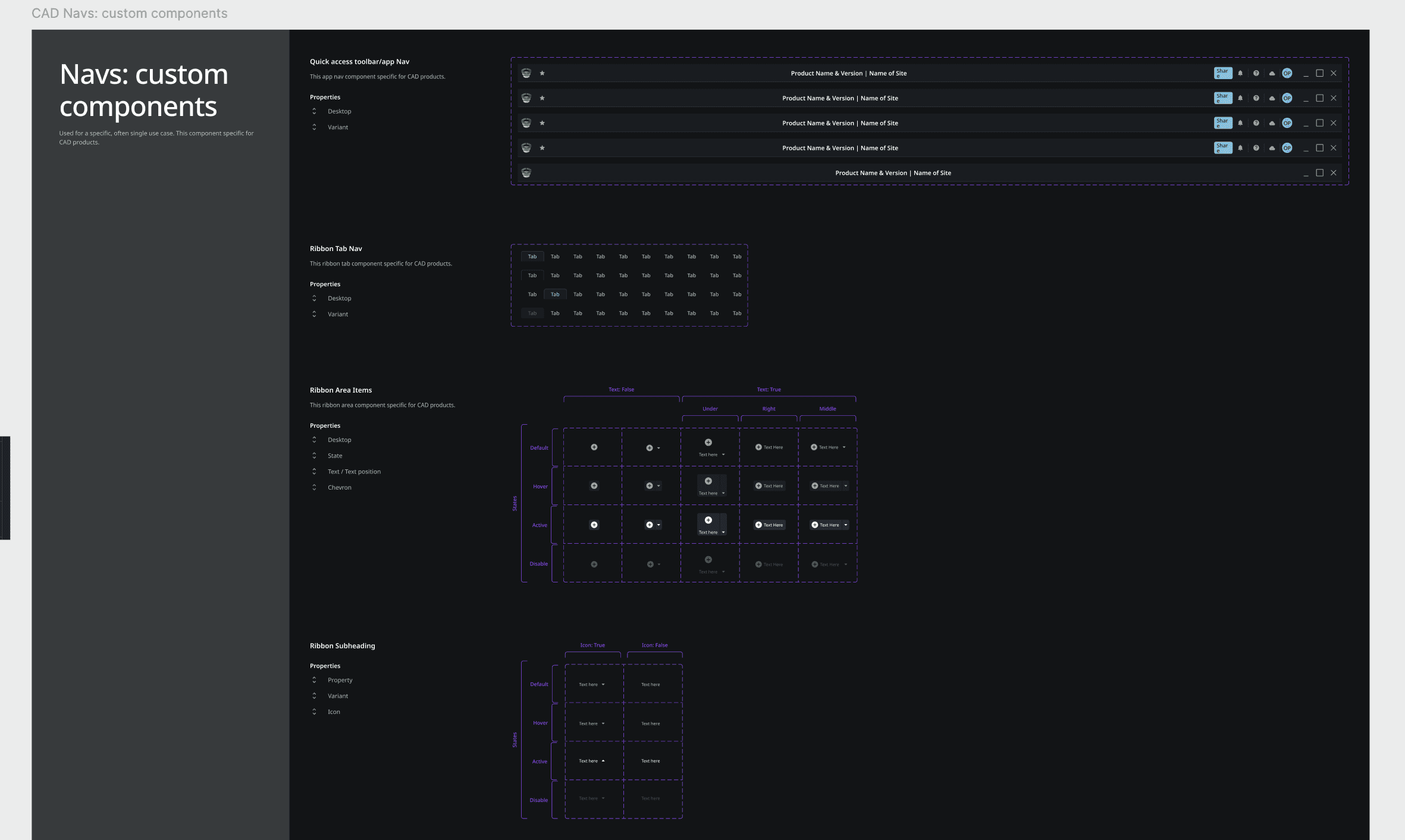
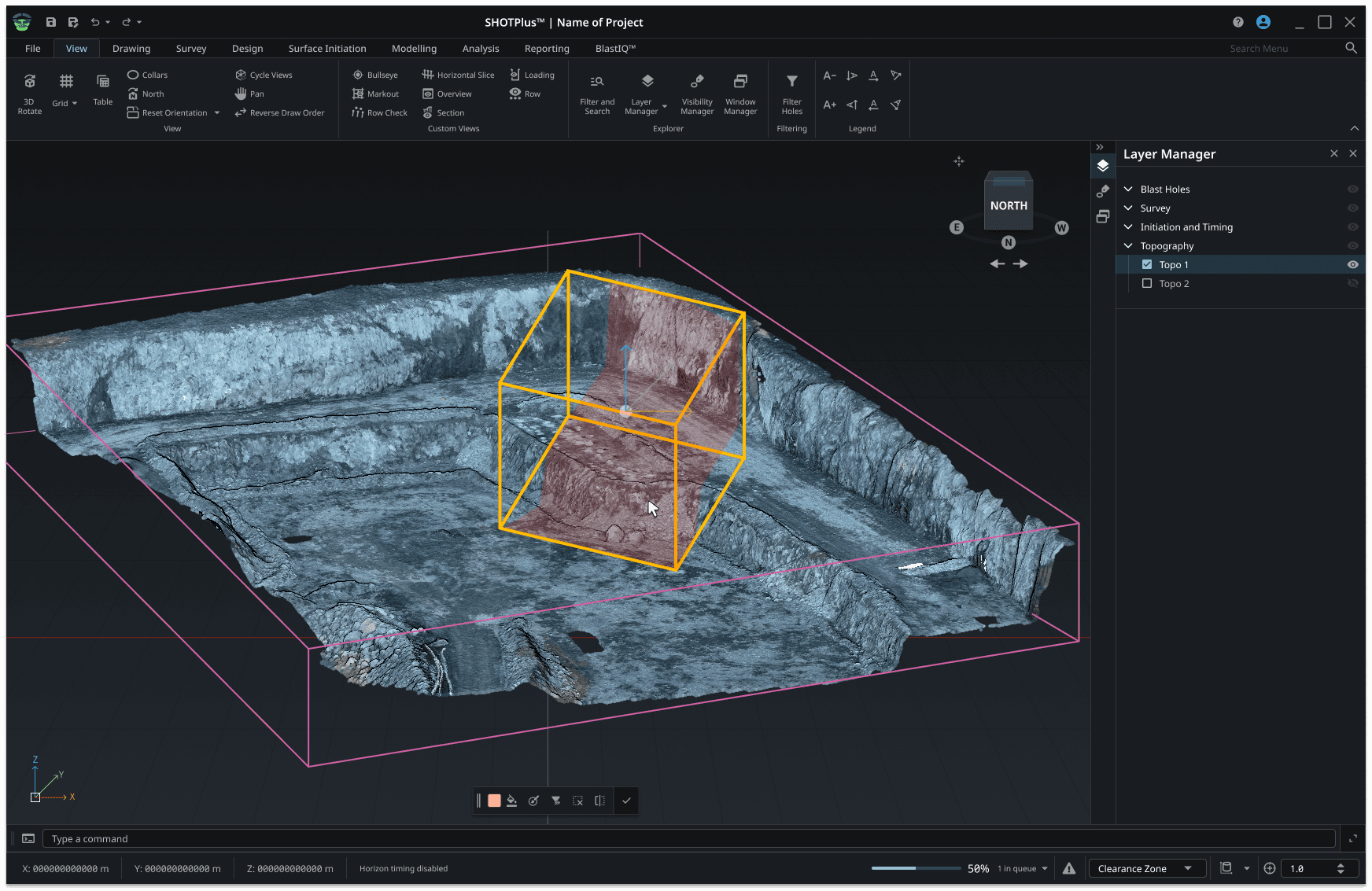
The work was structured into two layers: a UI shell framework that defines the overall application architecture, and a component library that defines the individual patterns within it.
App Bar & Ribbon MenuThe ribbon serves as the central hub for workflows, tools, and actions, designed to be space-efficient while offering deep functionality. Icon-based navigation with tooltips reduces visual clutter. The ribbon can collapse to save screen space while remaining accessible. | Side PanelsOrganised into a Main Fixed Panel for project and scene management, and a Secondary Panel for context-specific actions. Both support collapsed and expanded states — collapsing to a compact rail of toggle buttons, expanding on demand. Resizable with a defined minimum width to maintain legibility. |
Floating PanelsMoveable, resizable panels that hover above the viewport without interrupting the workspace. Up to five can be displayed simultaneously, floating to the left of the viewport by default, stackable and collapsible to manage screen density in complex sessions. | Contextual ToolbarDynamically updates based on the user's current selection or activity — displaying only the tools relevant to the current context. Appears floating at the bottom centre of the viewport. Distinguished clearly from floating panels to reduce cognitive overhead in tool selection. |
Footer & Utility BarThe footer provides real-time status indicators, contextual information, persistent controls, and application notifications. The utility bar sits below it, providing type-command access to actions, scripts, and functions without navigating through menus. | Toasts & Flyout PanelsToasts handle lightweight, non-intrusive notifications with configurable duration, position, and animation. Book flyout panels appear adjacent to their trigger element — visually anchoring supplementary context, settings, or actions to the UI element that called them. |

On top of the shell framework, a dedicated workflow pattern was defined for complex multi-step processes, wizard-style layouts with a left configuration panel, a real-time preview panel, and an action button bar. Three layout variants were documented to handle different workflow complexities, with a contextual panel available on the right or bottom for live feedback, validation, and expert-level controls.

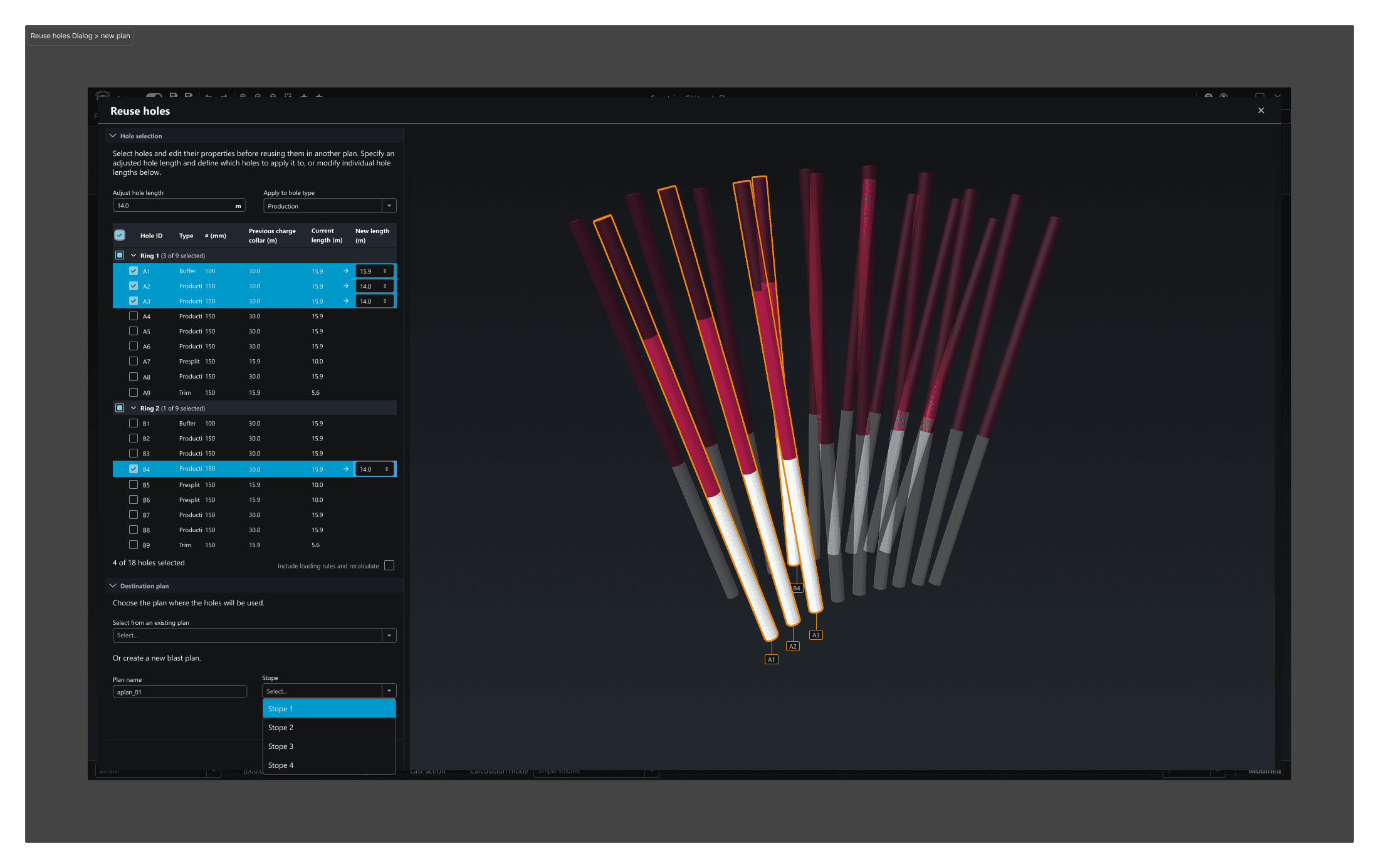
The preview panel was a deliberate decision. Engineers needed to see the impact of parameter changes before committing. Making that feedback immediate, rather than requiring a separate render step, reduced errors and built confidence in the workflow.
Both light and dark themes were built into the system from the start. Dark mode wasn't an afterthought or a visual preference; underground operations and low-light environments are a real use case for this application, and the theme needed to pass the same contrast and legibility standards as light mode rather than being a simple colour inversion. Each component was specified and validated across both themes.
The design system documentation was written for engineers, not just designers. Each component included rationale, interaction specifications, use cases, and clear guidance on when to use it versus the alternatives. The distinction between a contextual toolbar and a floating panel, for example, is not obvious without explanation, and getting it wrong produces exactly the kind of inconsistency the system was designed to prevent.
Status & Reflection
The foundational work, research synthesis, IA, design system, wireframes, and high-fidelity UI, is complete. The platform is now structured to absorb new capabilities without the patchwork accumulation that characterised the previous three decades of development.
Active work continues on collaboration tools to close the gap between office engineers and field crews, data management improvements to eliminate the Excel dependency, and integration touchpoints for the AI optimisation layer. The next step is moving into a commercialised state for general release.
The measure of success on a project like this isn't whether users notice the redesign. It's whether they stop needing the workarounds.
More Projects
Recent projects in web design and digital products